
File handling and security
How GVenta Kanban Board validates every upload: the executable hard-block list, magic-byte checks, private tenant-scoped storage and same-domain streaming.
Documented from GVenta Kanban Board version 2.1.15.
Uploading a file is the most defended path in GVenta Kanban Board. This page describes what happens to every attachment, avatar and project image between the moment you choose it and the moment a colleague downloads it, along with how credentials are protected.
The upload pipeline
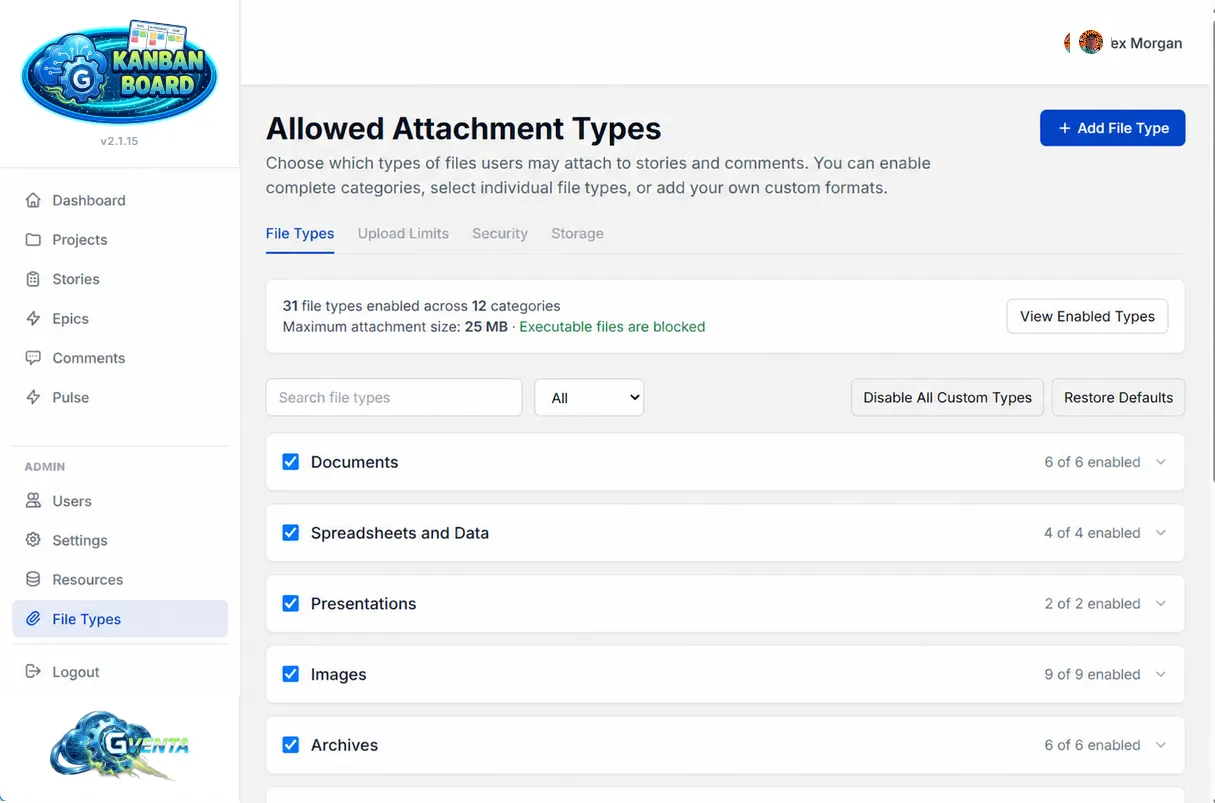 What administrators control: the allow-list, size limits and categories that feed the upload pipeline.
Every upload, from the interface or the API, passes through these checks in order.
- Transport check — any transport-level upload error is translated into a plain-English message.
- Location check — story attachments and comment attachments can each be disabled instance-wide by an administrator. If the location is disabled, the upload stops here.
- Double-extension defense — every extension segment in the filename is examined, not just the last.
invoice.pdf.exeis rejected on the.exesegment. - Platform hard-block list — a fixed list of extensions that can never be enabled by anyone, at any time, through any interface. See below.
- Extensionless rejection — files with no extension are refused.
- Allow-list check — the final extension must appear in the set of types your administrator has enabled on the File Types page.
- Size check — the file must be within the lower of the global maximum (default 25 MB) and any per-type override.
- Magic-byte verification — for PDF, PNG, GIF, JPEG and the whole ZIP-container family (DOCX, XLSX, PPTX, ODT, ODS, ODP, EPUB, KMZ), the file’s leading bytes must match its claimed extension. A renamed binary masquerading as a document is caught here. If the file cannot be inspected because of an I/O failure, the check fails open rather than blocking a legitimate upload.
- Server-side MIME detection — the real MIME type is derived from the file’s own bytes, not from the type the browser claims.
- Filename sanitization — the stored name is reduced to letters, digits, underscores and hyphens, then made unique with a random ID and a timestamp. Your original filename is preserved separately for display and download.
- Storage — the object is written to private object storage with a private ACL, never public, under a key prefixed with your instance’s tenant ID. The tenant ID, story ID, comment ID, uploader and original filename are recorded as object metadata.
- Record — an attachment record links the stored object back to its story or comment and its uploader.
- Audit — an activity-log entry records the upload.
Count limits also apply: by default 50 attachments per story and 10 per comment, both configurable by an administrator. Uploading to a comment through the API accepts at most 5 files per call.
The hard-block list
Approximately fifty extensions can never be enabled, regardless of any administrator setting or custom type:
| Group | Extensions |
|---|---|
| Windows executables and installers | exe, com, scr, msi, msp |
| Scripts | bat, cmd, vbs, vbe, wsf, wsh, ps1, psm1, psd1 |
| Unix shells | sh, bash, zsh, fish |
| Libraries and shortcuts | dll, ocx, cpl, jar, reg, lnk, url, hta |
| Interpreted and web-executable files | js, jse, mjs, php, phtml, phar, py, pyw, rb, pl |
| Disk and mobile packages | iso, img, apk, ipa |
Why it matters: Even a well-meaning administrator cannot accidentally open the door to executables, and a file that lies about what it is gets caught by its own bytes.
Serving files back
Downloading is equally deliberate. The browser is never redirected to object storage. Instead:
- The application generates a short-lived signed URL for the object on the server side and keeps it for slightly less than its validity period, so a URL the storage provider would reject is never used.
- The bytes are streamed through the application’s own domain with the correct content type and disposition headers.
- A matching private browser cache header is set so repeat views are cheap.
The client sees only https://your-instance.example. The storage bucket, the tenant prefix and the object key are never exposed. Avatars and project images are served the same way.
Tenant isolation
Every instance carries its own tenant ID. All object-storage keys are prefixed with it, and on every read, signed-URL generation and delete, the requested key must begin with this instance’s tenant prefix or the operation is refused outright. Instances that share underlying storage remain logically separated.
Who can delete an attachment
A story attachment can be deleted from the story sidebar or the API. A comment attachment can be deleted by its uploader, the comment author or an administrator. Deleted attachments are flagged as deleted rather than destroyed.
Secrets encryption
Git provider credentials entered on the Settings page are encrypted at rest with AES-256-CBC. The key is derived from the application secret, and a fresh random initialization vector is generated per value, so identical tokens never produce identical ciphertext. Token fields never echo the stored value back to the browser.
Caching fails open
The application caches a few things, including the signed storage URLs described above, to keep pages fast. That cache is engineered to fail open: if it is unavailable or errors mid-request, every read is treated as a miss and the live path runs instead. A cache problem never blocks a page.
Sessions and API tokens
Browser sessions use an HttpOnly, SameSite=Lax cookie backed by a server-side record, and logging out destroys that record. API tokens are validated for expiry and for the owning user still being active on every call. See Overview and API getting started.
Related pages
- Administration — configuring the allow-list and limits.
- Stories, epics and tasks — uploading from the interface.
- Integrations — the object storage service and its failure behavior.