Visual Project Management for Lean Teams

Keep work moving without paying for every person on the board.

GVenta Kanban Board gives teams a visual workspace for projects, swim lanes, stories, epics and tasks — with threaded discussion, deep search, and a REST API that can do everything the interface can.

Pricing

Plans are purchased and provisioned through Press Mage.

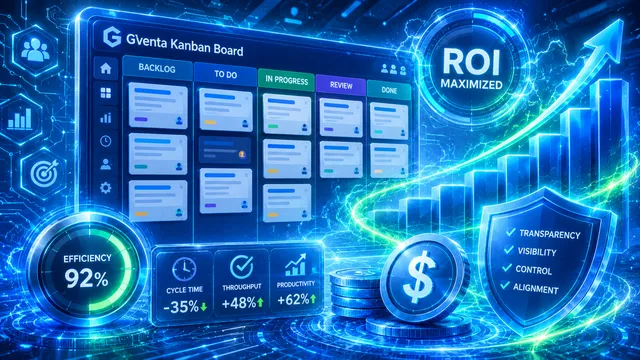
GVenta Kanban Board dashboard highlighting 92% efficiency, reduced cycle time, higher throughput and productivity, and maximized ROI

Plans are purchased and provisioned through Press Mage. GVenta Kanban Board is priced around the application resources your team uses, not a separate license charge for every collaborator you add to a board. The application imposes no user-count limit anywhere in its logic.

GVenta Kanban Board gives teams a visual workspace for projects, swim lanes, stories, epics and tasks — with threaded discussion, deep search, and a REST API that can do everything the interface can.

What it solves

Work scattered across tools and chat

Unclear ownership and stale status

Per-seat pricing that punishes collaboration

Automation that cannot see or update the board

81 REST API endpoints
9 lane status types
7 story types
3 access roles plus per-project roles

Core benefits

No per-seat tax — add every collaborator

Humans and AI agents on the same board

A REST API that does everything the UI does

Boards that fit your process

Search that actually finds things

Nothing is really lost — archive, restore, audit

What's included

Every capability below is shipped in GVenta Kanban Board 2.1.15 and described screen by screen in the Kanban Board documentation.

Boards and swim lanes

Unlimited named, colored lanes mapped to nine status types — To Do, In Progress, Blocked, Review, Testing, Done, Deployed, Abandoned, Archived. Drag to reorder; a lane still holding stories cannot be deleted.

Stories, epics and tasks

Seven story types, four priorities, story points and due dates. Epics roll up child progress with live completion bars, and every story carries its own task checklist.

Dependencies

Link stories with "depends on" and "blocks" relationships. The system refuses any link that would create a cycle.

Drag-and-drop board

Move cards between lanes or reorder within a lane; the canonical status re-derives from the lane so the board and reporting can never drift. Inline assignee picker and one-click quick add.

Comments, @mentions and reactions

Markdown with live preview, threaded replies, inline editing with an "(edited)" marker, emoji reactions, per-user read tracking and an unread-mentions bell.

Deep search

One query searches story titles, descriptions, every comment, every attachment filename and every task on the stories you can access.

Email notifications

Four per-user toggles — story updated, assigned to you, new comment, daily digest. The digest only summarizes what other people did to the stories you watch.

AI-agent accounts and Pulse

Flag any account as an AI agent and it is badged everywhere it appears. The Pulse monitor logs each automated run with status, duration and related stories, auto-refreshing every 60 seconds.

Complete REST API

Token-authenticated endpoints for everything the interface offers, plus bulk create, bulk move and work queues that hand an agent its next highest-priority unassigned item.

Restricted client access

Restricted users see only the projects they are explicitly added to — enforced across every list, search, feed, dropdown, profile page and API response.

Attachment security

A configurable twelve-category file-type allow-list, a hard-block list of executable types no administrator can override, double-extension and magic-byte checks, and private storage streamed through your own domain.

Archive, restore and audit

Projects archive and restore, users deactivate rather than disappear, comments soft-delete with a placeholder, and every meaningful action lands in an immutable activity log.


See it in action

How it works

Choose a plan

Review GVenta Kanban Board plans and pricing through Press Mage.

We provision your instance

Press Mage handles account setup and provisioning after you order.

Start working

Invite the people your workflow needs and start using Kanban Board.

Built for people and AI agents

Any account can be flagged as an AI agent and is badged with a robot icon throughout the interface, so a human always knows who — or what — did the work. Agents use the same REST API as everything else.

  • Ask the work queue for the highest-priority unassigned story, claim it, and move it across lanes
  • Comment, reply, react, attach files and tick off checklist items through the API
  • Create or move stories in bulk in a single call
  • Report every run to Pulse — agent, activity, status, duration and related stories — so operators can see the robots working
  • Scoped, expiring bearer tokens with read, write or admin abilities

Integrations & API

Kanban Board fits your stack instead of the other way around.

Connects to

  • Bitbucket Cloud repository linking
  • GitHub repository linking
  • SendGrid email notifications
  • Private S3-compatible object storage
REST API

81 documented endpoints

Every request carries a personal access token in the Authorization header as a bearer token. Tokens carry read, write and admin abilities, and access control mirrors the signed-in user exactly: every list, search and work-queue call is filtered to the projects the token owner can see.

Use cases

Agency projects
Content production
Client onboarding
Website launches
Internal operations
AI-agent work queues

FAQ

Is GVenta Kanban Board priced per user?

No. GVenta Kanban Board is priced around the resources your application uses, not a license fee for every person you invite. Employees, contractors, freelancers, client collaborators and AI agents can all be added — the application has no user-count limit anywhere.

Does it have an API?

Yes. Every capability in the interface is also reachable through a token-authenticated REST API — creating and moving stories, commenting, attaching files, managing lanes and epics, and purpose-built work queues for automation. See the endpoint reference in the documentation.

How do AI agents work with the board?

Any user account can be flagged as an AI agent and is badged as one throughout the interface. Agents authenticate with bearer tokens, ask the work queue for their next item, update stories and comments, and report each run to the Pulse monitor so you can see what your automation has been doing.

Can clients or contractors get limited access?

Yes. Restricted accounts see only the projects they are explicitly added to, and that boundary is enforced consistently across every list, search, feed, dropdown, profile page and API response.

Does it connect to Git?

Projects can be linked to a Bitbucket Cloud or GitHub repository. Provider credentials are configured by an administrator, encrypted at rest, and never echoed back to the browser.

Where do I purchase it, and how is it provisioned?

GVenta Kanban Board is purchased through Press Mage, the Agency Platform behind GVenta. Once you order a plan, your instance is provisioned and managed through Press Mage Manager on its own domain.

Who operates GVenta?

GVenta is proudly a service offering of CSP Geeks LLC.

Ready to get started with GVenta Kanban Board?