Help Desk Software for Lean Support Teams

Support more people without paying for every support agent.

GVenta Help Desk turns the mailboxes your customers already use into a tracked ticketing system — with a branded client portal, knowledge base, business-hours SLAs, reporting, and a REST API behind every screen.

Pricing

Plans are purchased and provisioned through Press Mage.

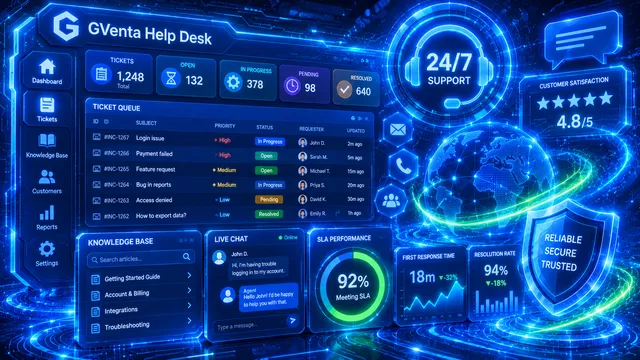
GVenta Help Desk dashboard highlighting ticket queue status, 24/7 support, a 4.8 out of 5 customer satisfaction score, and SLA performance metrics

Plans are purchased and provisioned through Press Mage. Support teams can involve the right people — across departments, shifts, or escalation paths — without automatically purchasing another agent license for each collaborator.

GVenta Help Desk turns the mailboxes your customers already use into a tracked ticketing system — with a branded client portal, knowledge base, business-hours SLAs, reporting, and a REST API behind every screen.

What it solves

Requests lost in shared inboxes

No history, no SLAs, no reporting

Internal notes leaking to customers

Per-agent pricing that penalizes collaboration

186 REST API endpoints
6 ticket statuses
5 report tabs
2 inbound mail providers — Microsoft 365 and IMAP

Core benefits

Customers keep emailing — you get structure

One workspace for every conversation

A branded portal for self-service

SLAs that respect your working week

Everything is an API

No per-agent licensing

What's included

Every capability below is shipped in GVenta Help Desk 1.8.55 and described screen by screen in the Help Desk documentation.

Email-to-ticket

Monitor Microsoft 365 and IMAP mailboxes — several at once. New mail becomes a ticket; replies thread onto the right ticket by conversation ID, message ID or ticket number, with sender verification to stop hijacking.

Ticket workspace

Table and Kanban views, multi-select status, priority, customer and contact filters, bulk assign / status / priority changes, and a resizable ticket drawer with inline editing.

Replies, internal notes and CC

Reply to customers or leave internal notes that are stripped server-side before anything reaches the portal. CCs pre-populate from conversation history; attachments go out as real email attachments.

Customers and contacts

Company and person records. Set a company's email domain once and every future email from that domain files itself under the right account, creating the contact automatically.

Client portal

A separately branded self-service portal: instant registration with a ticket number or email-verified sign-up, ticket creation with attachments, threaded replies, and a company-scoped knowledge base.

Knowledge base

Rich text editor with media library, unlimited category nesting, four visibility levels (public, internal, restricted, company-specific), drafts, tags, featured articles and helpfulness voting.

SLA engine

First-response and resolution targets per priority in business minutes, with a business-hours calendar, timezone and holiday list. Deadlines are computed at ticket creation and reported on.

Reports and analytics

Overview, Customers, Contacts, Agents and Sources tabs; date presets from Today to Last 12 Months plus custom ranges; dual SLA compliance; response-time distribution; agent leaderboard; CSV export that matches the on-screen filters.

Branding and email templates

A full palette of interface colors applied live without a rebuild, separate client-portal branding, and six editable HTML email templates with documented merge fields and live preview.

Team notifications

Five configurable events with their own recipient lists, a daily report at the time you choose, weekly and monthly digests, and a Send Test action for each event.

Roles and AI-agent boundaries

Four staff roles with explicit permission sets. AI-agent accounts have separate "reply to customer" and "suggest answers" switches that the server enforces on the reply endpoint.

Complete REST API

JWT and API-key authentication, CSRF exemption for server-to-server calls, and endpoints for tickets, messages, customers, knowledge base, reports, SLA, notifications, email sources and more.


See it in action

How it works

Choose a plan

Review GVenta Help Desk plans and pricing through Press Mage.

We provision your instance

Press Mage handles account setup and provisioning after you order.

Start working

Invite the people your workflow needs and start using Help Desk.

Built for people and AI agents

A staff account can be flagged as an AI agent with two independent switches — reply to customers, and suggest answers — enforced by the server on the reply endpoint rather than by trust. Agents work through the same API as staff and are badged with a robot icon wherever they appear.

  • Let an assistant draft internal suggestions only, or reply to customers directly — your choice, enforced server-side
  • Create tickets from any system with an API key; unknown sources auto-register as filterable channels
  • Read conversations, post replies or internal notes, and change status, priority and assignment through the API
  • Query roles and permissions at runtime so integrations can adapt without hard-coded rules

Integrations & API

Help Desk fits your stack instead of the other way around.

Connects to

  • Microsoft 365 mailboxes (inbound and outbound)
  • IMAP mailboxes
  • SendGrid outbound email with automated domain authentication
  • Private S3-compatible object storage
  • Prometheus-compatible metrics endpoint
REST API

186 documented endpoints

Staff endpoints take a JWT from POST /api/auth/login (or fall back to the browser session), long-lived API keys are sent as X-API-Key or Authorization: Bearer, "flexible" endpoints accept either, and client-portal endpoints use client-scoped tokens. Requests authenticated with an API key are exempt from CSRF.

Use cases

Customer support
Internal IT requests
Agency client support
Website maintenance requests
Operations requests
Shared service teams

FAQ

Is GVenta Help Desk priced per agent?

No. GVenta Help Desk is priced around application resources rather than a license fee for every support agent you add.

Can support requests come from email?

Yes — email is the front door. The Help Desk monitors one or more Microsoft 365 or IMAP mailboxes, converts new mail into tickets, threads replies onto the right ticket, matches senders to the right company, and ingests attachments — all without a human touching it.

Do customers get a portal?

Yes. A separately branded client portal lets contacts register (instantly with a ticket number, or via an email-verified link), raise tickets with attachments, follow conversations, and search a knowledge base scoped to exactly what their company is allowed to see. Internal notes are never sent to the portal.

Does it have an API?

Yes. Every screen is backed by a documented REST endpoint, authenticated by JWT or long-lived API keys, covering tickets, messages, customers, contacts, knowledge base, reports, SLA settings, notifications and email configuration. See the endpoint reference in the documentation.

Can an AI agent answer tickets?

Only if you allow it. An AI-agent account has separate "can reply to customer" and "can suggest answers" switches, and the reply endpoint enforces them on the server — an agent without permission is refused.

Can multiple departments or mailboxes use it?

Yes. Multiple inbound mailboxes run side by side, each with its own color band on ticket cards, and every mailbox files tickets under the right customer automatically.

Where is it purchased, and how does provisioning work?

GVenta Help Desk is purchased through Press Mage. Once you order a plan, your instance is provisioned and managed through Press Mage Manager on its own domain with its own branding.

Ready to get started with GVenta Help Desk?